Returning to the city
After three years working on the English translation of Illusion City, I needed a break. Translation 1.0.0 and ROM 0.3 were released in September 2025, and for a while I was happy to leave the game alone. Coming back to it made me want to finish the smaller things that had remained on the list—and finally investigate how the game actually spends its time.
This work grew into translation 1.0.5 / ROM 0.5. The biggest change is that the ROM now runs on MSX2 and MSX2+ with 256 KB of mapper RAM and MSX-MUSIC. Making it start was only the beginning. A game designed around the Turbo-R can spend a surprising amount of time rebuilding things which have not changed at all.
The aim was to keep the game looking and behaving like Illusion City: the same scenery, moving characters, animations, targeting and damage. The improvements come from understanding which work is necessary, preserving useful results, and correcting bugs we can demonstrate.
Opening the door to MSX2
Removing the Turbo-R check in Fray DOS lets us get past the first barrier, but it does not make the rest of the program portable. The FM driver also assumes that Turbo-R timer hardware exists. Waiting for that hardware on an ordinary MSX2 is not a useful way to play music.
The ROM now detects built-in MSX-MUSIC or an FM-PAC and uses an adapted FM write path on Z80 machines. Turbo-R keeps its timer path. The ROM automatically selects R800 mode on Turbo-R and the supported Panasonic MSX2+ turbo mode.
There was another problem hiding behind the CPU speed difference: an FM update can take long enough on Z80 for the next music interrupt to arrive before it finishes. Entering the same interpreter again would mix two updates of shared channel state. The new guard queues the incoming tick and handles it without recursively running the player. Music, effects and the screen interrupts still have their work to do.
Why is an almost black screen still slow?
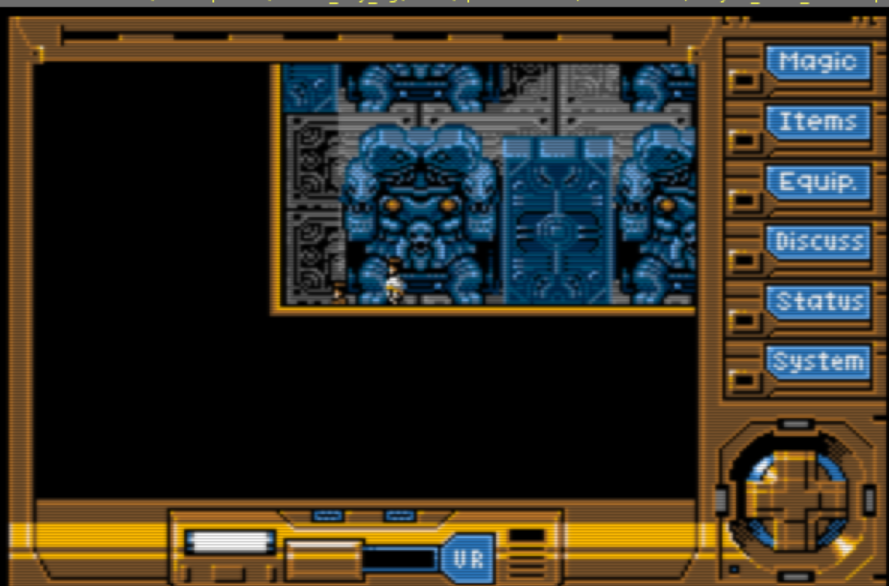
The screen is the final result of several jobs. The engine expands map data into working buffers, compares tile identities, decides which layers are visible, repairs the background under characters, and asks the VDP to draw. A black tile can still go through the same bookkeeping as a detailed wall.
The first improvement caches unchanged expanded map buffers. The next reuses the result of comparing and composing their layers. If the map and its relevant state are unchanged, repeating those calculations cannot produce a different background.
Example: a character walks across a quiet room
The room has not changed, but the character has. We can retain the background composition while still repairing the character’s old position and drawing at the new position. The existing damage information tells the renderer which cells need attention. “Reuse the map” must never mean “leave the old character on the screen.”
Unchanged scenery
A character moves
The camera advances
Conceptual diagrams, not screenshots or exact engine dimensions. Blue denotes reusable data, orange denotes character repair, and striped cells denote newly exposed map data. Map-buffer reuse does not eliminate the separate drawing and display work.
There are two physical display pages, so the cache also needs to know which page has actually been prepared. A result that is current on one page cannot simply be assumed to exist on the other. Each page earns its own valid state; changes invalidate it and take the full path again.
| Machine | Original pass | Reuse pass | Complete redraw |
|---|---|---|---|
| MSX2 · 3.58 MHz | 78.22 ms | 11.31 ms | 301.90 → 201.97 ms |
| MSX2+ · 5.37 MHz | 52.13 ms | 7.54 ms | 187.41 → 134.11 ms |
| Turbo-R · R800 | 10.19 ms | 1.79 ms | 74.67 → 65.64 ms |
The MSX2 pass becomes much cheaper, but the complete redraw does not become seven times faster. Character drawing, interrupts, VDP work and display waits are still there. These measurements isolate the composition change: expanded-map caching is already enabled in both versions. Each machine’s pair starts from the same state; the scene’s actor and dialogue state differs between machines.
Further work shortens clean-tile scans, skips columns with no pending work, and reuses overlapping map strips during supported scrolling steps. Larger or unsupported changes fall back to full expansion. We also corrected cache invalidation after loading a save: ordinary resource reads were throwing away useful map results, which explained why an apparently faster version could feel slower in a loaded game.
Knowing what really changed
An animation timer advancing does not necessarily change anything in the current view. Rechecking every tile because an unrelated animation changed wastes much of the benefit of caching.
The renderer now records the animation entries used by each expanded map during its normal comparison work. On a later animation update, it checks those exact entries. If their values are unchanged, the existing map is still valid. If one changes, the normal comparison and expansion path runs.
Example: a blinking sign elsewhere in the map
A sign outside the expanded view may advance its animation while the visible floor and walls stay identical. The old broad check could send us back through the map. The dependency list shows that this particular view does not use the changed entry. When a visible animated tile does change, it is still rebuilt and drawn.
Collection is bounded: each layer can retain up to 31 exact animation ID/value pairs. If it needs more, the optimization falls back to the full check. This avoids making a visual decision from a guess or a hash collision.
In the I51 test scene, matched warm redraws fell from 351.98 to 160.69 ms on MSX2, from 222.51 to 110.76 ms on turbo MSX2+, and from 68.45 to 49.18 ms on Turbo-R. Building the list has an initial cost. Scenes whose visible animation really changes still need the full work, and already-cached scenes do not gain the same improvement again.
Taking the same idea into battle
Battles have their own map and composition paths, so improving field maps alone does not solve them. The battle renderer now caches unchanged expanded buffers, reuses layer visibility decisions, tracks animation dependencies separately for each layer, and skips clean columns.
Consider a spell which animates one background layer while the other remains still. The unchanged layer can retain its map instead of being expanded again on every animation step. The changing layer still rebuilds. Actor movement, attack effects, target selection and HP updates continue normally.
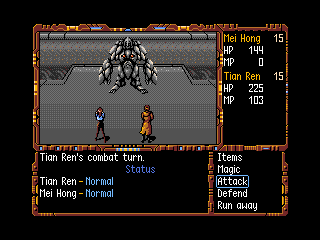
For one complete controlled Guard Robot turn, adding composition reuse on top of battle map caching reduced elapsed time from 5.371 to 4.287 seconds on MSX2, 3.573 to 2.955 seconds on turbo MSX2+, and 1.988 to 1.968 seconds on Turbo-R. The number of redraws stayed the same in each pair.
That small Turbo-R difference is useful information. Saving CPU work does not remove VDP and timing waits. Later per-layer animation tracking also helps spell redraws, but its percentage cannot simply be added to this turn’s improvement: it measures different work against a different preceding build.
Why unpack the same interface again?
I noticed the interface being unpacked repeatedly during conversations and when entering or leaving elevators. The picture itself had not changed. The engine was paying to decompress the same 24 KB frame again whenever it needed to restore it.
ROM 0.5 keeps an already-expanded copy in unused ROM space. The restoration routine can copy those bytes to VRAM and then perform the normal scene redraw. This trades a little cartridge space for less CPU work, without allocating another persistent RAM image buffer on a 256 KB machine.
Compressed interface → decode 24 KB → transfer to VRAM → redraw scene
Expanded ROM copy → transfer to VRAM → redraw scene
| Machine | Decompressing | Expanded ROM copy | Less time |
|---|---|---|---|
| MSX2 · 3.58 MHz | 4,119.9 ms | 1,383.3 ms | 66.4% |
| MSX2+ · 5.37 MHz | 2,536.1 ms | 951.3 ms | 62.5% |
| Turbo-R · R800 | 738.3 ms | 593.1 ms | 19.7% |
These timings include scene reconstruction, VDP waits and music interrupts. They measure this transition, not walking speed or every menu in the game. The full frame—including its black areas—is restored. Interrupts stay enabled during the bulk copy, and the routine respects the existing cursor-upload and memory-bank ownership rules.
Turning an old suspicion into a reproducible bug
The translation had already benefited from two unusual surviving versions: my copy contained dialogue differences, while Randam/232’s contained code differences. Comparing them helped recover fixes that were not present in the version most people had. This time, each remaining difference needed an explanation before it became another patch.
One result is the restored moving attack animation for the SHIVA Guard Robots. We checked the complete turn, including the selected target and damage, rather than accepting an animation which merely looked right.
“Low chance that Tian Ren is attacked”
This report had sat in the old issues list because it sounded like something that might be chance or a player’s impression. The code revealed a specific fault: the target chooser wrote its current choice into the first entry of the candidate list while it was still walking that list.
[ Tian Ren, Shu Lao Shi ]
Both characters are eligible.
[ Shu Lao Shi, Shu Lao Shi ]
Tian Ren has disappeared from the candidates.
The fix keeps the candidate list intact until the walk finishes, then writes the result. It does not give Tian Ren an artificial chance bonus. The original random selection, distance preferences and status checks remain.
In the captured two-member party fixture, calling the selector with all 65,536 possible random seeds selected Tian Ren zero times before the fix. Deferring the write produced 32,768 selections for each character, and the assembled fix matched that reference. These were selector tests, not 65,536 played battles. Swapping the party order moved the defect to the other character, confirming that it was a list-order problem.
Other confirmed corrections
- Nectar of the Gods: consuming the revival effect now clears both the battle and persistent character records, so rebuilding a battle record cannot arm it again.
- Headgear: paralysis protection blocks paralysis instead of blocking its cure.
- Free field magic: Zhuo Shi Kai’s spell restores the correct caster pointer instead of overwriting Tian Ren’s MP. Zhuo’s zero MP cost is preserved.
- Failed confused attacks: a character without ammunition ends the failed turn instead of retrying or receiving a free attack.
- Instantaneous Return: with no valid destination, the game displays the barrier message and returns to the caster menu instead of repeatedly casting and reopening the error.
HP/MP effects also safely skip empty target-list entries, complementing the translation’s earlier target-count correction. Other suspected differences, including some HP/MP and EXP/level-up paths, were left alone when we could not establish a new bug. A different instruction sequence is a clue, not proof that the current game is wrong.
Finding the spells you already have
The original Magic window used three horizontal groups. Long English names needed full-width rows, but the translated vertical list kept the empty category slots. That left large gaps between spells, making it easy to think there was nothing further down.
The menu now builds the original 48-slot temporary list and compacts its known spell IDs in place. It changes the presentation, not the learning tables or saved progression. Each time the menu is rebuilt, newly learned spells are included. Spells which are known but unavailable in the current situation remain listed and keep their normal availability checks.
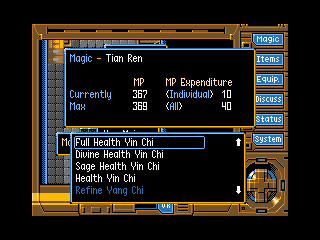
In the late-game save used for verification, Tian Ren keeps all 29 known spells while losing 19 empty slots. Zhuo Shi Kai keeps all 16 while losing 32 empty slots. The final page and scroll limit follow the real count, including when switching to someone with fewer spells.
The right-side mouse arrows also needed attention. Their visible positions and click areas now agree, and window refreshes restore them. A related battle-menu bug showed why cursor state matters: drawing an arrow disturbed the selection-frame state and its two-pixel alignment adjustment. The next erase could damage the old outline or copy fragments into the window. Preserving that state fixes the battle Items and Magic cursor corruption.
A separate mouse-pointer bug appeared after using Instantaneous Return to Kai and then Discuss. The arrow looked displaced, but its graphics were intact: the portrait palette routine left the VDP in 16×16 sprite mode while the pointer uses 8×8 sprites. Keeping the correct mode fixes the arrow without adding transfers or changing palette timing.
The smaller repairs add up during ordinary play: the Speed Adjustment window keeps responding to Left/Right after Space; refused or empty Sell selections clean up their outlines; Debug and Save Anywhere restore the screen; using the last copy of an item no longer gives a false error sound. Protected-item discard, equipment restrictions, full inventory and insufficient MP now have English explanations instead of only a negative sound.
A larger picture through a smaller buffer

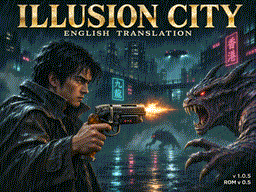
The interlaced logo contains two 54,272-byte bitmap fields. It would be wasteful to reserve a complete decompression buffer for each. CBS Cruncher v5.5 compresses each field as one continuous stream, and the decoder uses a rolling 16 KB history buffer.
As the buffer fills, completed spans go to VRAM. The write position wraps around and reuses the RAM, while matches can still refer to data within the 16 KB history window. The image is not cut into separately compressed 16 KB pictures, and the buffer size does not limit its total dimensions.
The two fields compress from 108,544 bytes to 8,561 bytes combined, plus the 32-byte palette. The SCREEN 8 title uses the same streaming approach: 49,152 raw bytes become 24,313 compressed bytes. SCREEN 8 has fixed colors, so the palette fades belong to the SCREEN 7 logo.
Building and checking the new ROM
The working folder now contains the editable scripts, graphics and fonts, together with extraction, compression and build tools. The build retains the required Disk 1 → ROM → Disk 1 → ROM assembly order. This makes the improvements reproducible instead of depending on a collection of old working directories and manually patched files.
The release includes an IPS patch for ROM 0.3 and an RCD conversion for the eight original English disks. Both routes are verified to produce the same ROM 0.5 byte for byte. The package also includes the Carnivore 2 IC.RCP preset, Windows game launchers and release notes formatted to fit an 80-column MSX screen.
The complete original release is preserved unchanged as original/IC100ENG.ZIP, including its disk patches, manuals and extras. If you start with Japanese disks, extract that archive separately and follow its disk translation instructions. Then use the new rcd/icrom_0.5.rcd to convert the eight translated disks directly to ROM 0.5; building ROM 0.3 first is unnecessary. The combined download is about 85 MB.
Recommended openMSX build
For emulator play, use Max Iwamoto's openMSX build on GitHub. Download the Windows x64 ZIP and install the complete package for the supplied game launchers. It improves FlashROM save persistence across compatible ROM updates and adds convenient mouse capture and Makoto / YM2608 support. Makoto PC-98 music for Illusion City is coming soon; ROM 0.5 retains its FM/MIDI soundtrack.
Choose openmsx-rom-dev-2026.10.28-windows-x64.zip from the release assets. This is my unofficial build based on openMSX 22.0. Extract the complete package, including share and its DLLs, into C:\Program Files\openMSX, and provide your own machine firmware and FM-PAC ROM. Then use the game's MSX2, MSX2+ or Turbo-R launcher; it selects ASCII16-X for FlashROM saving and keeps settings and saves in .local/openmsx-user beside the game.
The improved Flash handling keeps sectors changed by in-game saves while taking untouched sectors from the current ROM. Back up your profile before upgrading: older full-chip saves can still hide ROM updates, and the game's save format must remain compatible. Older emulator builds cannot read the fork's new .flash files, so keep their profiles separate.
For mouse play, connect an MSX mouse through the Input menu, then click the display to capture it; that first click only captures. Middle-click releases it. The current game launchers do not need the Makoto extension.
What the measurements establish
The timings in this article were measured with my updated openMSX build (2026.10.28), using controlled emulator runs. Paired tests restore the same CPU, RAM and VDP state and change the implementation under examination. Depending on the routine, checks compare expanded maps, layer composition, actor records, target and damage results, display-page state and VRAM. Scrolling, animation changes and moving characters are exercised explicitly; menus and transitions also have keyboard and mouse checks.
The figures describe individual changes at the point they were measured. They are not a single ROM 0.3-versus-0.5 full-game benchmark, and their percentages must not be added together. This is substantial emulator coverage of named scenes and controlled cases, not an exhaustive playthrough or physical-hardware certification.
Coming soon: Makoto PC-98 music in Illusion City
Next on the music side: bringing Makoto PC-98 music to Illusion City. This is an upcoming addition; ROM 0.5 currently retains the original FM/MIDI player with its compatibility fixes. The speed improvements measured here do not depend on switching music off.
You can explore all of the game’s maps and their layers in the Illusion City map archive on maxiwamoto.me.
Released November 15, 2026. Original game artwork and design belong to Micro Cabin and their respective rights holders. Captures and diagrams here illustrate the ROM work; the new startup artwork is part of this translation update.